

Journal reports are how we keep you connected to your pet’s care, even when you’re away. After every visit, your pet care provider sends a detailed journal through our app so you can see how everything went and feel confident your pet is happy, safe, and well cared for.
Below are answers to the most common questions about viewing, understanding, and interacting with your journal reports.
What is a journal report?
A journal report is the update you receive after each completed service with your pet. Once your visit is finished, your assigned team member writes and submits a journal report in our app, Precise Petcare.
You’ll be notified as soon as the journal is ready via email and push notification (as long as the app is installed on your phone), so you can check in right away.
Each journal report includes:
- Visit details
Date, service type, and visit timing - Care checklist
Items such as potty breaks, meals, medications, and other care tasks completed during the visit - Visit photos
So you can see your pet and how they did during the service - Journal map (for walks)
A visual record of your sitter’s route and distance walked - Care notes & observations
A personalized summary from your sitter sharing how your pet did, including mood, behavior, and any notable moments
Journal reports are designed to give you clarity, peace of mind, and a real sense of your pet’s day.
How do I view a journal report?
You’ll be notified as soon as a journal report is submitted after your pet’s visit. Notifications are sent via email and push notification right after your assigned team member completes the service.
To view the journal:
- Tap the “New Pet Care Journal” notification, and you’ll be taken directly to the report within your client account.
If you’d like to view a journal from a past visit or no longer have the notification:
- Log into your client account
- Find the service you’d like to review
- Click the journal icon inside the service box to open the report
Once a journal has been viewed, the journal icon will appear white, indicating it’s already been opened.
How do I leave a comment or rating on a journal report?
You can leave both a rating and a comment directly within the journal report.
- To leave a rating, scroll to the section just below the GPS map in the journal.
Once you’ve written your comment, be sure to click the Post button so it goes live and is visible to your care team.
What is a journal map?
A journal map is included in journal reports and can be found toward the bottom of the report.
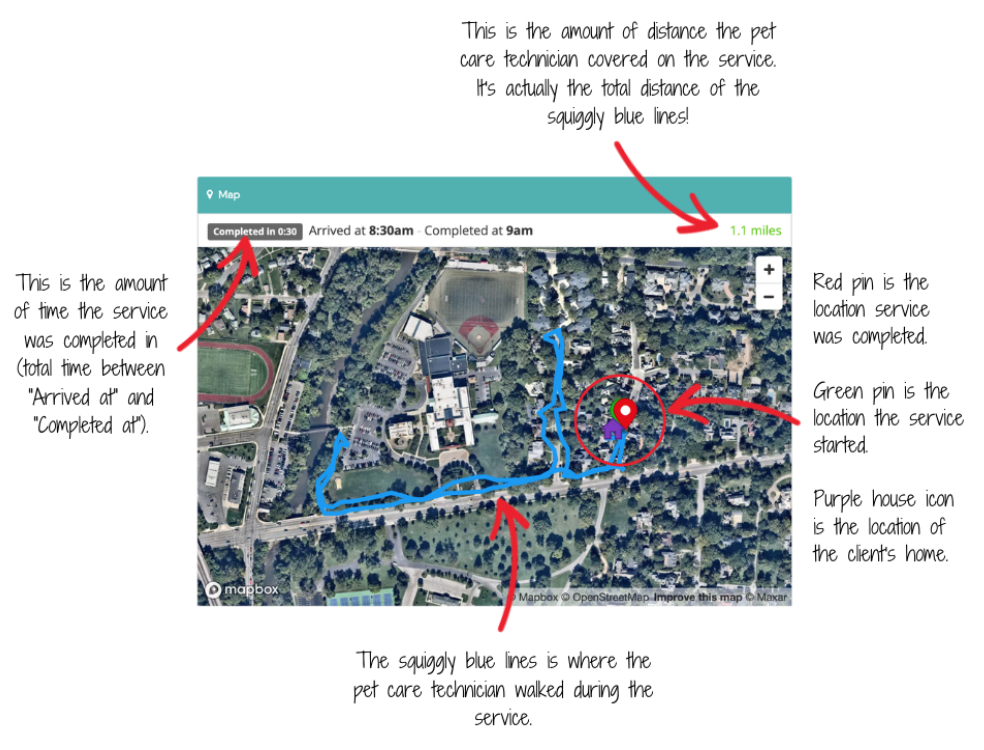
Journal maps show the location and movement of your pet care provider during the service. For dog walks, this allows you to see the route taken and overall distance walked, offering added transparency and reassurance.
They’re a helpful way to stay connected to your pet’s experience and understand how the visit unfolded.