

- How do I schedule a service?
- How can I tell you exactly what I’m needing done on a service?
- How do I know my service request went through?
- Can I edit/cancel after submitting my service request?
- How can I check the status of my service request?
- What if my service request gets declined?
- When will my caregiver be assigned?
- How do I know which caregiver from your team is assigned to my service?
- Does “N/A” in the service box mean no one is available?
- FAQs
How do I schedule a service?
You can easily schedule services through your client account. Please note that all services must first be requested. Once submitted, we review and confirm appointments based on team availability. While we strive to accommodate every request, there may be rare instances where we must decline due to scheduling conflicts. However, with our large team, we accept the vast majority of service requests.
To request a service with us, please complete the steps below:
- On the right hand side of the page, click

- Fill out the form with date(s) of service, cadence (how often it repeats), pets, and services/time blocks
- Once finished, click Submit

Once you click Submit, you can see your request appear on the Schedule page as a service box with a red  tag.
tag.
How can I tell you exactly what I’m needing done on a service?
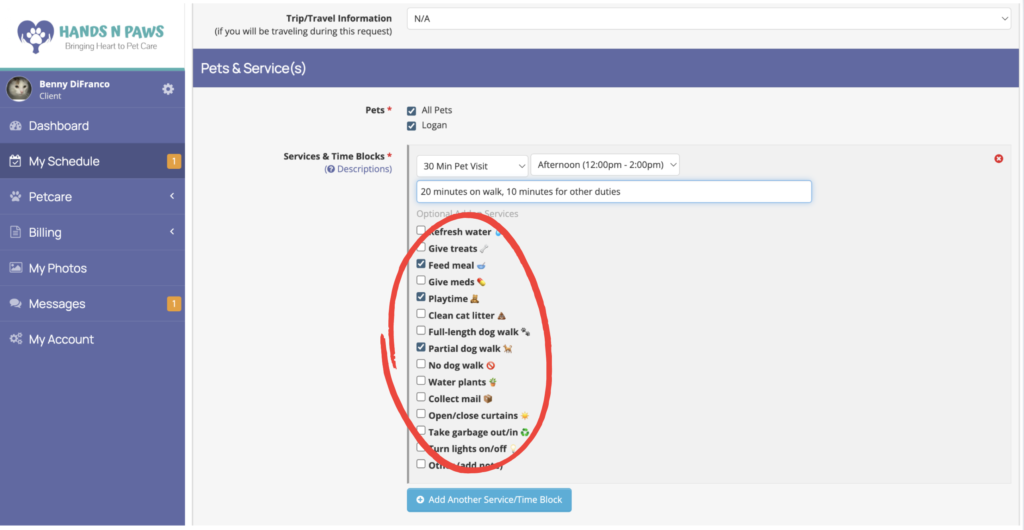
🔹 Use the Checklist in the Service Request Form
When submitting your request, you’ll see a checklist beneath the Service Type and Arrival Time Block dropdowns. This is where you can select any additional duties you’d like us to perform.
Details about your selections should also be reflected in your Personal Profile and/or Pet Profiles for consistency.
The checklist includes a range of pet care tasks as well as house care options (ideal if you’re traveling or away for extended periods).
📝 Use the Notes Section for Time Breakdown
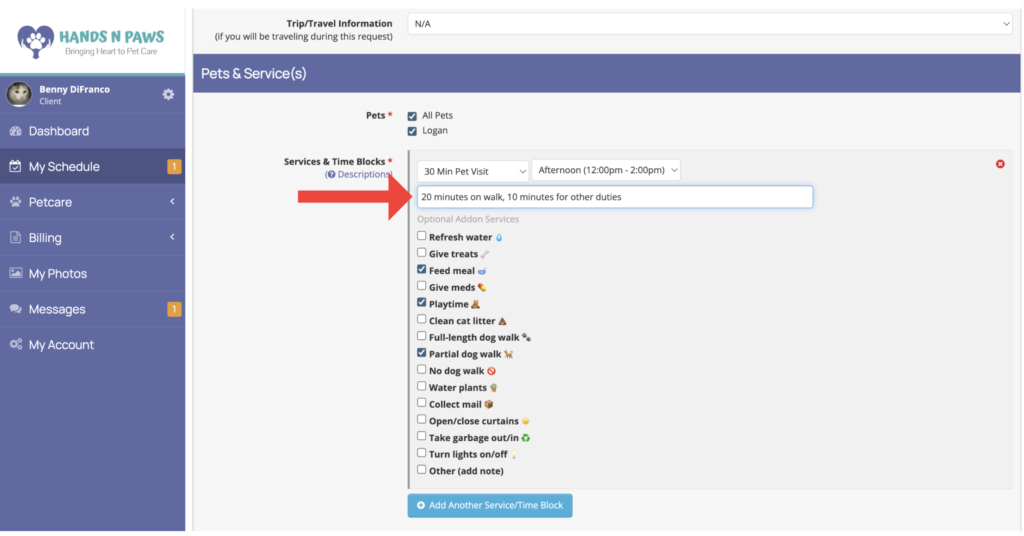
Want us to split the visit a certain way? Just tell us in the Notes field!
For example: “Please spend 20 minutes walking and the last 10 minutes on feeding and playtime.”
How do I know my service request went through?
You’ll know your service request has been submitted in two ways: first, a green confirmation box will appear at the top of your screen as soon as you click Submit.

The second way is by checking your Schedule page—the requested service(s) will appear there as white boxes with a red tag inside them.
Can I edit/cancel after submitting my service request?
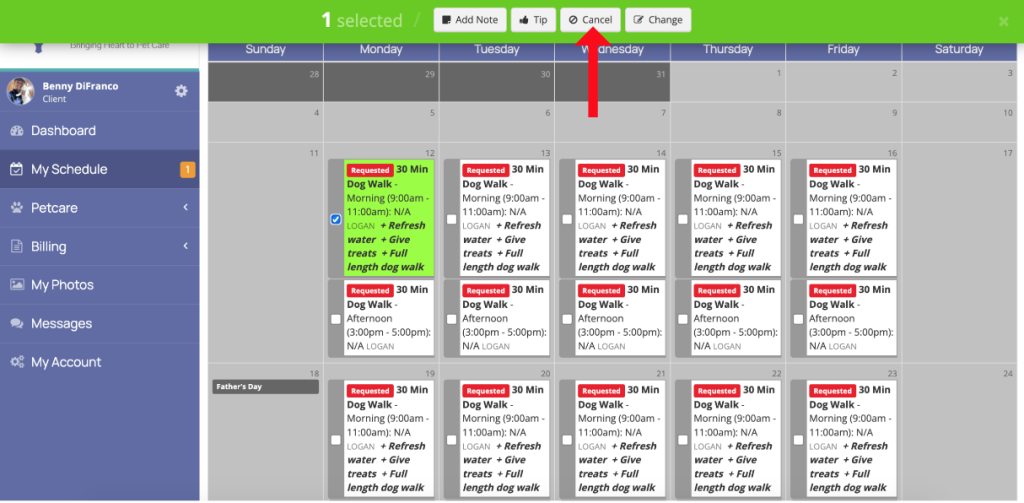
To Cancel a Request:
- Go to your Schedule page
- Locate the service box (white box with
 tag)
tag) - Click Cancel (or Delete) within the box
To Change a Request:
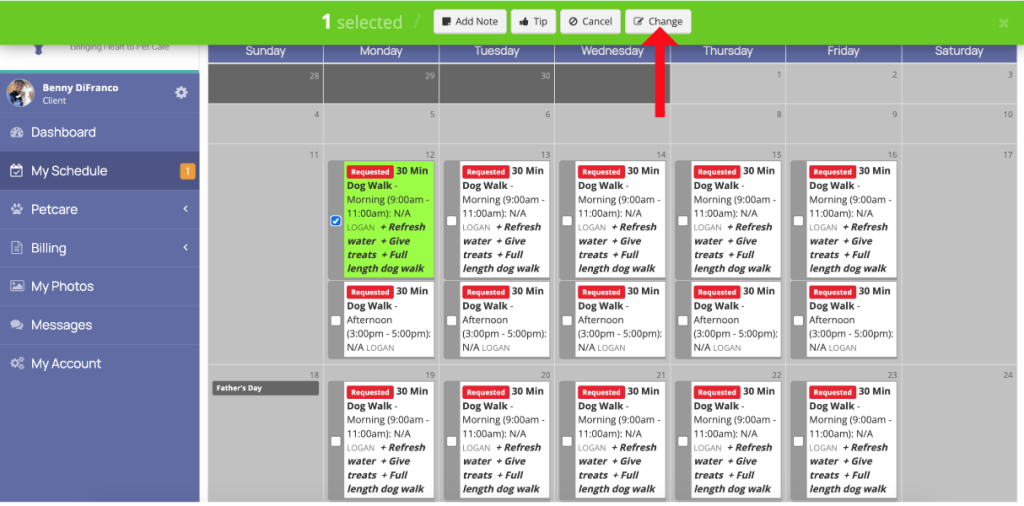
- On your Schedule page, find the service box
- Click Change to open the edit form
- Check the box next to the field(s) you want to modify (e.g., time block)
- Enter your changes and click Save or Request Changes
How can I check the status of my service request?
You’ll receive an email once your request is either confirmed or declined. That’s your official confirmation—please don’t rely on the color-coding of service boxes on your Schedule page, as green services don’t necessarily mean it’s confirmed.
Example: If your service is confirmed, you’ll receive an email like this:
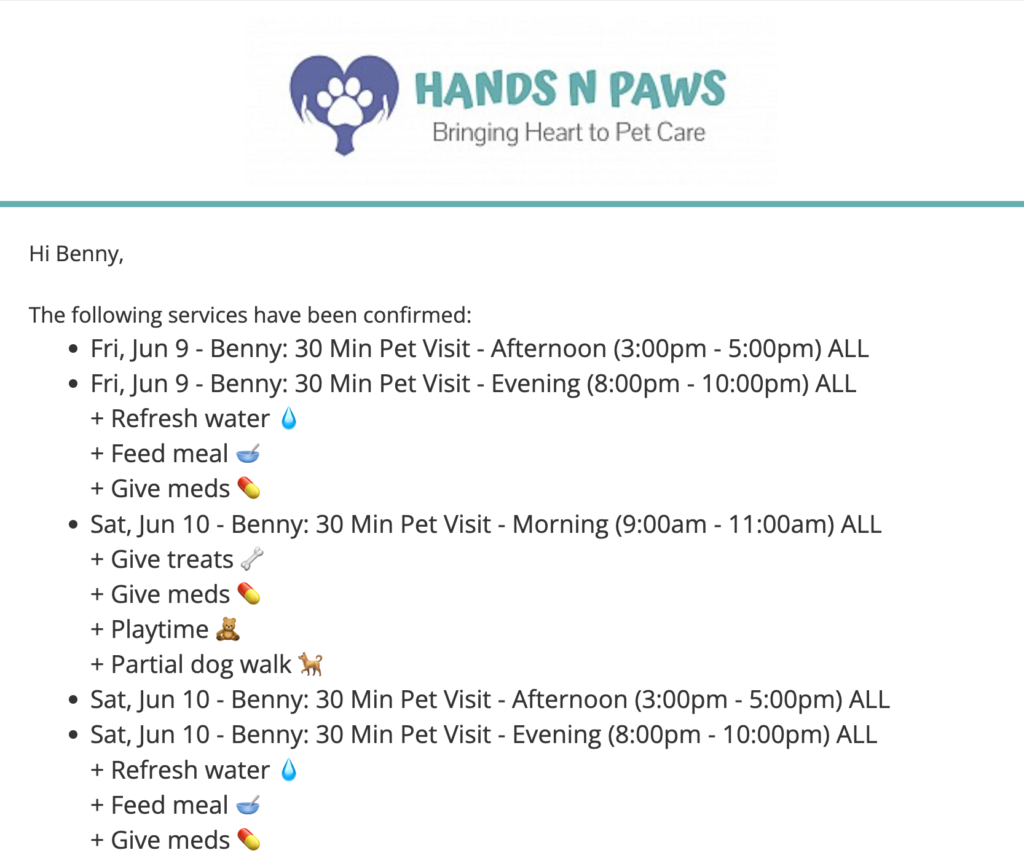
If it’s been awhile and you haven’t received an update, please contact us. We’re happy to help!
What if my service request gets declined?
We do everything we can to accommodate all service requests, but occasionally a request may be declined due to a lack of staff availability during your requested time.
Here are a couple of things you can try if this happens:
🔄 Adjust the Time Block:
Try submitting a request for a nearby time block that might still work for your schedule.
⏱️ Change the Service Duration:
Sometimes adjusting the visit length (e.g., requesting a 30-minute service instead of 45 minutes) can help us find coverage.
📅 How to Tell if a Request Was Declined:
Declined services will appear on your Schedule page with a red  tag.
tag.
We truly apologize for any inconvenience and hope to care for your pets soon!
When will my caregiver be assigned?
Sometimes a team member is assigned right away, and other times it may take a little longer—especially if the service is scheduled further in advance.
What’s most important is receiving your service confirmation email. That confirmation means your request has been accepted and we’re committed to fulfilling it.
Team assignments may follow later, but rest assured: if your service is confirmed, we’ve got you covered!
How do I know which caregiver from your team is assigned to my service?
You can check who’s assigned by visiting your Schedule page.
Find the service box for your visit, then look for the underlined name inside the box—that’s your assigned caregiver!
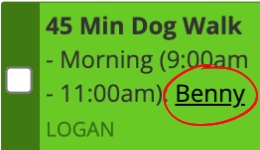
If you see “N/A” and no name listed, it simply means the visit hasn’t been picked up by a team member just yet. But don’t worry—we’re on it!
Does “N/A” in the service box mean no one is available?
Not at all!
If you’ve already received a confirmation email, your service is good to go—”N/A” just means a team member hasn’t been assigned yet. Someone will pick it up by the day of the service.
If you haven’t received confirmation yet, it means we’re still reviewing your request. You’ll hear from us soon with either a confirmation or a declination.
Bottom line: If it’s confirmed by email, your pet is in good hands—assignment is just the next step!