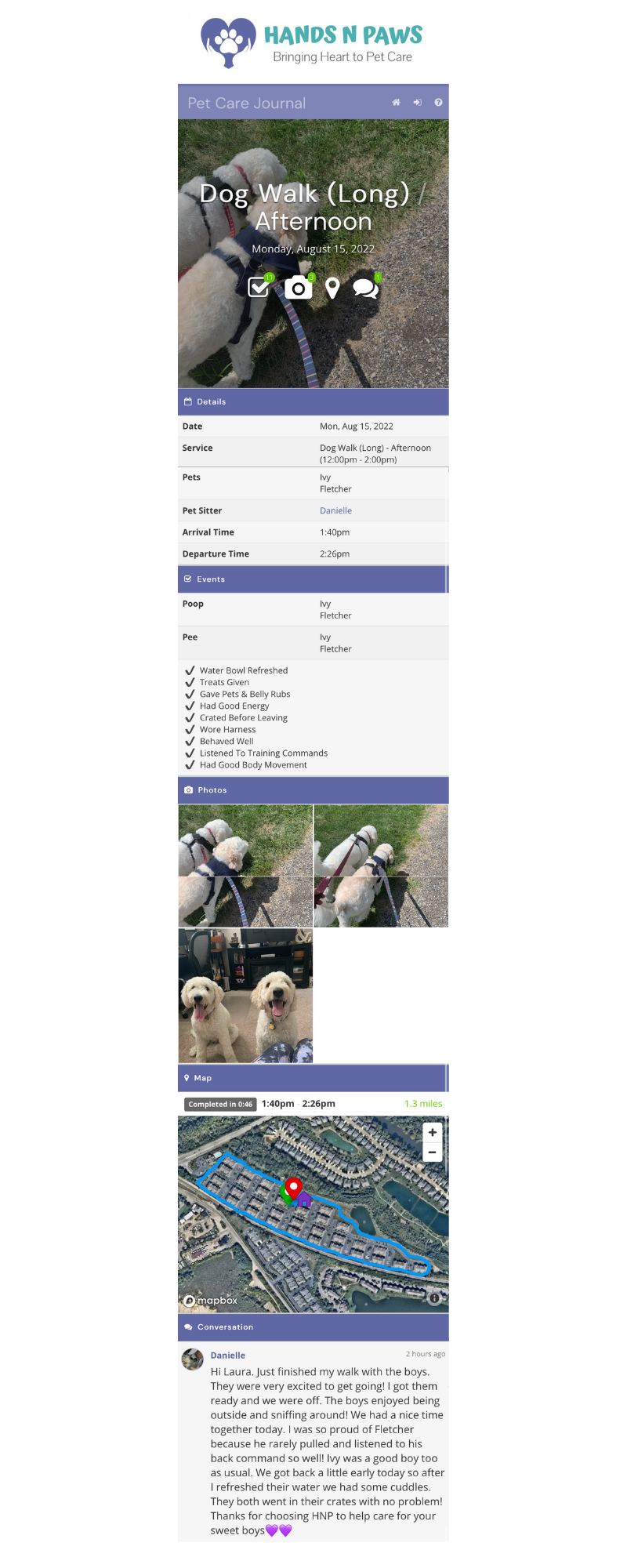
Think of your journal report as more than just an update; it’s the delivery of peace of mind. It’s the client’s window into your visit, a vital record for our team, and the single most important tool for building the trust that keeps our clients coming back. A great journal doesn’t just list tasks—it tells a story and makes the client feel connected to their pet’s day.
Sending a detailed journal after every visit is a non-negotiable part of your role at Hands N Paws.
The Anatomy of a 5-Star Journal Report
Every section of the journal form plays a key role. Here’s how to master each one.
The title is the headline for your visit. A clear, descriptive title helps the client quickly understand the context.
Examples:Monday Afternoon Dog Walk, Thursday Morning Cat Visit, Tuesday Evening Pet Visit.
B. The Checkboxes: The Factual Backbone
This section provides a quick, at-a-glance summary of the service. Accuracy is critical.
Double-Check: It’s easy to miss a checkbox. Always review before sending.
The Dotted Line: Notice the line in the “Other Actions” section. It separates pet-care duties (above the line) from household duties (below the line), making it easy to identify all relevant tasks.
C. The Notes: Where You Shine (The P.A.W.S. Method)
This is where your personality and care truly come through. Use the P.A.W.S. acronym to craft engaging, comprehensive notes every time.
P – Preface with an opener.
Start with a friendly greeting like, “Hi [Client Name]!”
Be creative and welcoming to set a positive tone.
A – Always keep things positive.
Be bright, expressive, and friendly.
If a situation arises (like a potty accident), explain how you navigated it positively and resolved it.
W – What specifically happened? (Detailed summary)
Provide a detailed, start-to-finish account.
Describe what happened when you arrived, the duties you completed, how the pets behaved, and what you did before leaving.
The more detail, the better! This is what clients love.
S – Statement of gratitude.
Express your appreciation to the client.
Thank them for the opportunity to care for their pets.
End on a warm, positive note.
D. The Photos: Proof of Life & Fun
Photos are non-negotiable. They provide visual proof of a great visit and are often the highlight of a client’s day.
Photo Best Practices:
Quantity & Selfies: Follow the client’s preferences in their account notes. If none are specified, include at least 4 photos, with one being a selfie of you with the pet(s).
Quality: Shoot in good lighting, get down on the pet’s level, and try to avoid blurry shots.
Candid Over Posed: Happy, action-oriented shots (playing, walking) are often better than forced poses.
Safety First: Always stop walking before taking a photo. Never walk and use your phone simultaneously.
What to Avoid: Do not post photos of pets that are hiding, scared, or going to the bathroom.
E. The Map: Your Digital Footprint
Journal maps are automatically generated when you start and end a service by clicking the and buttons inside the service box (provided your GPS settings are enabled).
Best Practice:
Always Check for Accuracy. Maps can be unreliable. Upon submitting, view the map in your journal. If it looks inaccurate, add a comment in the journal to clarify the actual route you took.
Go to My Schedule and locate the service box containing the journal you’d like to view.
Click on the journal icon inside the service box.
Once the journal report loads, scroll down to locate the GPS map.
Examine the map to determine if it looks accurate.
If the map is inaccurate, write a comment to the client within the journal itself, stating the actual route and providing clarity.
Fill out the form using the 5-Star Anatomy guide above.
Click “Save and Email Client” at the bottom.
You’ll see a green “Pet Care Journal Added” confirmation, and a blue journal icon will appear in the service box. It turns white once the client has viewed it.
Need a visual? Watch our step-by-step video here:
Pro Tips for Power Users
Writing with Speed and Style
Leverage ChatGPT: Use AI to help draft the notes section of your journal.
Pro Tip: To make it sound more like you, provide ChatGPT with a sample of your writing and ask it to mimic your style.
Find Inspiration: Check previous journals for a client by visiting Profiles > Clients and scrolling down to Office Only > Recent Journals to see what other team members have written!
Keeping It Fresh
If visits feel routine, vary your journals by:
Highlighting unique behaviors or small changes.
Using creative language (e.g., “we explored the backyard” vs. “we went outside”).
Incorporating different, unique photos each time.
Noting any progress in the pet’s training or behavior.
Troubleshooting & Common Questions
How can I revisit a journal after I’ve already sent it?
To revisit a submitted journal, go to “My Schedule” and find the service box that contains the journal you wish to view. Click on the journal icon (either or ). The journal will then load onto your screen.
Can I edit or delete a journal after it’s sent?
No. Journals cannot be edited or deleted by team members once submitted. If a major error occurs, contact a Team Lead on Slack for help. For minor omissions (like a forgotten photo), submit a second journal and explain in the notes why you’re sending a follow-up.
Do I still have to send journals if the client doesn’t read them?
Yes! Journals are vital for the entire team and for quality assurance. They provide a record for other team members and allow team leaders to provide feedback and acknowledge your great work.
Why can’t I see the Journal button?
The journal button only appears within a service box on the day of the scheduled service.
My journal won’t send!/The map is messed up!
If you see an “action syncing” message, it’s often due to poor reception. Move to an area with better service.
For persistent GPS/map issues, check that your phone is updated, not in low power mode, and that the Precise Petcare app is updated. If the issue persists, contact Precise Petcare’s support team directly.
How do I view and respond to client comments and ratings?
To respond to comments, click the journal icon in the service box, scroll to the bottom, and post your reply in the comments thread.
To view your ratings, go to Resources > Ratings in Precise Petcare.
Can I submit multiple journals for a single visit?
Yes! If you need to, you can submit multiple journals for a single visit. Precise Petcare allows this in case you forget to include a specific detail in your first submitted journal or if the journal didn’t submit properly the first time around. This is why the Journal button doesn’t disappear within a given service box after you’ve clicked it, filled out the form, and submitted a journal for the first time. To submit another journal, simply click , fill out the form, and click Save and Email Client at the bottom.
Key Takeaways
Journal Immediately after every visit.
Use the P.A.W.S. Method for engaging notes.
Photos are mandatory—at least 4, including a selfie.
Always check the map for accuracy and comment if it’s wrong.
When in doubt, over-communicate. Transparency builds unbreakable trust.


 and
and  buttons inside the service box (provided your GPS settings are enabled).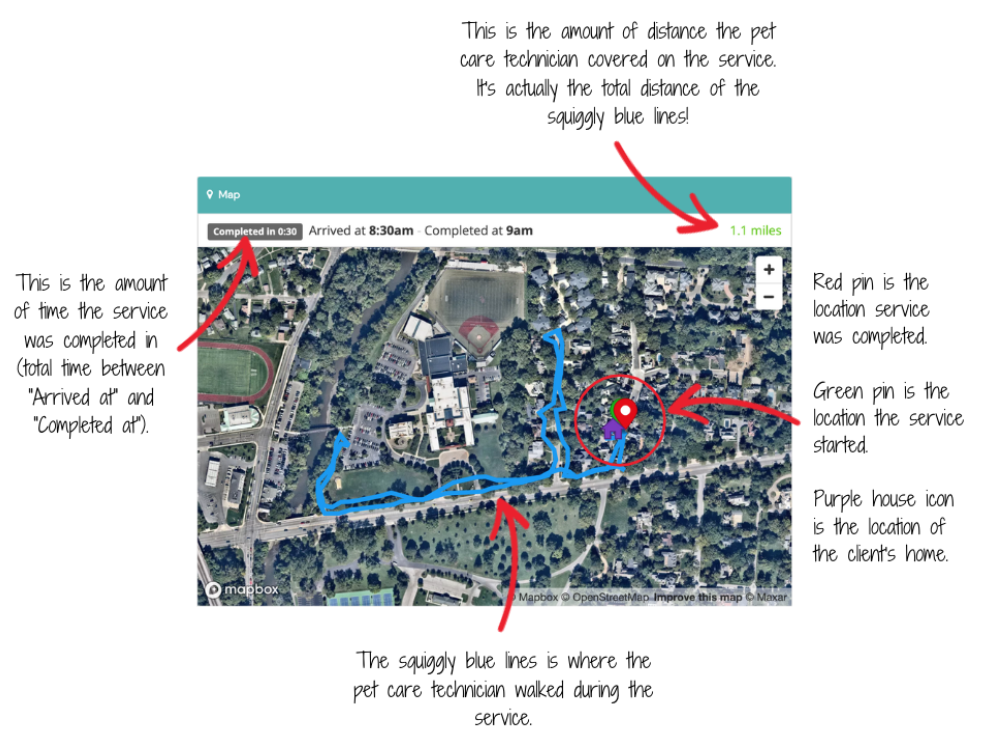
 inside the service box.
 .
. once the client has viewed it.
 or
or  ). The journal will then load onto your screen.
 only appears within a service box on the day of the scheduled service.